ManageBac Tip No 2: Collaboration
Using the collaborative features and a shared Google Doc was a game-changer for giving feedback and observing group processes. If you are using MB for arbitrary tasks, then you are probably not familiar enough with it. Take the time.
Now I am not trying to promote ManageBac, but having been in a situation where colleagues are wary of it and bamboozled by it, or in some cases even resentful of it due to a bad experience many years ago, I have this need to record and share my experiences and best practices with it. I went from hating it, to being bamboozled by it. However, with a little shift in your thinking, you can create rich learning opportunities that also ease your workload.
Workarounds for collaboration on ManageBac
The thing that I have started to realise with ManageBac is that with a creative mind, you can imitate and replicate many of your favourite apps (Though you need a little bit of technical knowledge and a tenacious spirit to get there).
One laptop per group and one person keeping a record is a way to keep the conversation going,
Whole-class collaboration on one document. This can be done with different texts or activities per group or on the same text. This makes it easy for the teacher to observe group processes, give feedback as they are working and intervene with groups that are struggling to start. It also provides ease for students to see what others are doing and learn from each other. Teacher corrections are there for everyone
Each of these were given as single document ( one as a pageless Google Doc and the other as slides whee each group worked on a different aspect of the mini-research project.
Group students on one document with one submission date. This probably works best when students are working on a collaborative presentation for the class, where a hard copy of their presentation is needed. It would also work best where students are doing a group formative on the same topic.
Not all collaborations have to be hard work. It could be a class check-in
Collaboration on a single/pageless GoogleDoc can be a great place for a mindmap for a knowledge harvest, or group reflection, or brainstorming of ideas, or hexagonal thinking. Something like this that doesn't need to be graded could be a binary formative.
Developing a shared document of a body of knowledge where each group develops knowledge on one aspect of a topic. For example: in science, one group could be researching what cells are in general, another group focuses on the structure of cells, while another discusses membrane structure or transportation. In an English class, where students are learning about non-verbal communication,- one group could be focusing on para-linguistics, another on body language and so on.
How to do it
Place your template into your school's Manage Bac folder. (Different schools may have different permissions, but let's assume for now that your school has ManageBac accessing files in a designated folder.)

Then, go to your class assessments. Fill in the appropriate boxes and then click Formative. 
Click on Google Docs coursework submissions. This will then open up to your school MB folder, and from there, you will find your template.. Check with your schools administrator. 
Assigning dividually: Each student file will be automatically copied and have their name on it Assigning collaboratively can be done as a whole class or can be done in groups.. It will then show boxes at the bottom saying assign students individually. As it states, when students click on the assessment in their MB, a copy of your template with their name is automatically made. However, if you choose to assign collaboratively, then everyone will be on the same document.

If you want people in groups, you will deselect all and click on the names per group. You will do this multiple times in the same assessment file ( the same date and assignment name). Tip: Have your lists of groups ready? Call them Group 1. I just realised how confusing calling each group the same thing can be.

Why not give students a link to my Google Docs and let them make their copies?
You get different file names (unless you are a super teacher who manages to get students to save files the right way without the risk of a student defiling a document as a joke).
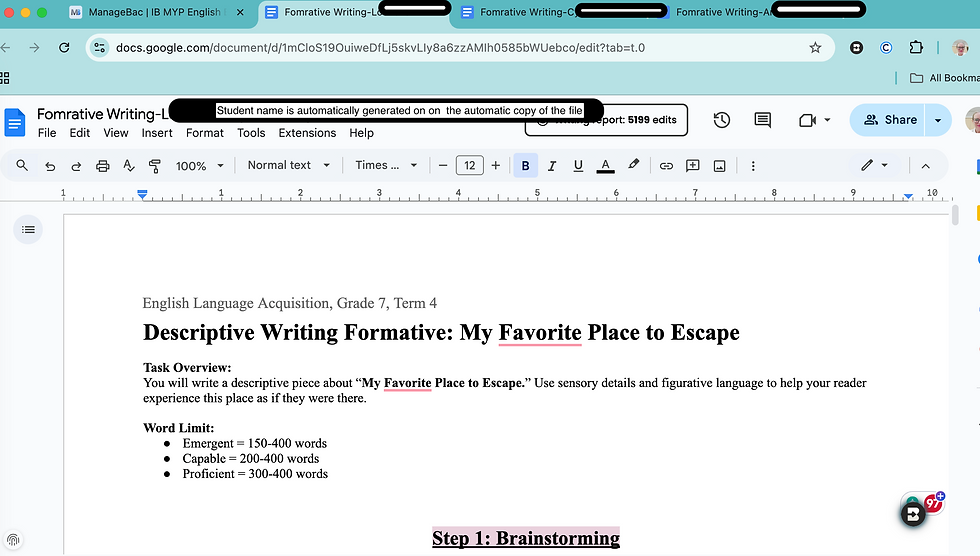
You can open up multiple files and scroll through the, What's the benefit of using Managebac?
You can easily access files from one location, your classes, the MB calendar and the home page. You can see immediately who has started, who hasn't, and you can open each of the files and monitor progress. I am sure we have all had experiences of students sending files with multiple file name formats, via Google Chat, WhatsApp app and Gmail.
You can observe students working both on the document and in real time.
You can force submit or allow submission extensions easily in MB.
Records are kept immediately as a one-stop mark-book/ notebook.
It doesn't matter which technology you are using, just make sure you are using it in a way that enhances your teaching and makes your load easier. Don't try and impose your old ways or old habits onto a new system. Learn the system and make it work for you. If you feel like you are doing arbitarary tasks, then you are probably using your learning management system wrong.
Please let know what you think below. Like and comment below.

Comments